
Umami - Recipe Manager
Strange QuarkFood & Drink
4.6117.00 Reviews
- Version
- 1.93
- Installs
- 10.00K
- Age Rating
- Everyone
Screenshots
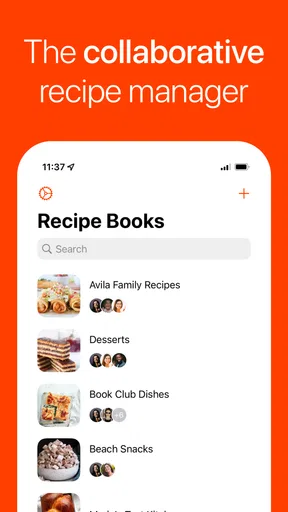



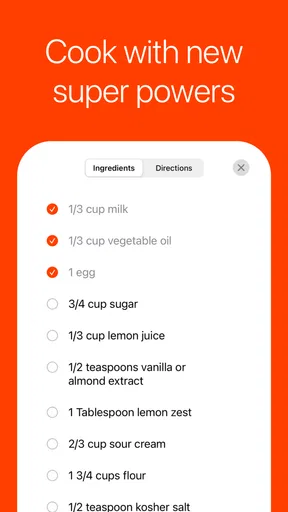

Our Review of Umami - Recipe Manager
 Analysis by Appyee
I’m wary of recipe apps that promise to organize everything but make the simple act of choosing dinner feel like another task. Umami’s appeal, in my view, is more practical: it gives recipes a place to live and connects them to meal planning, so the collection can help answer the everyday question of what to cook next. Umami - Recipe Manager is a food and drink app from Strange Quark, and its strongest case is for people who save recipes from different places and want to use them rather than keep scrolling past them.
A recipe library that can grow with you
Importing recipes is the feature that shapes the experience. Instead of copying every ingredient and instruction by hand, I can bring a recipe into the app and then keep it alongside the rest of my collection. That matters most when your cooking ideas are scattered across food sites, personal notes, and saved pages. The benefit is not simply having more recipes; it is being able to return to them in one organized place.
A useful habit is to tidy an imported recipe before relying on it for a shop. Online recipes can include long introductions or details that do not match how I cook, so checking the saved ingredients and instructions helps avoid a surprise later. I’d also add a short note when I make a meaningful change, such as using a different ingredient or adjusting the seasoning. That turns the recipe collection into a record of what worked for me, not just a pile of things I meant to try.
Planning works best when it stays realistic
Meal planning can easily become overambitious: a calendar full of elaborate dishes is not much help on a tiring weekday. Umami’s planning tools are more useful when I treat them as a flexible outline. I can place a recipe on a day, see the week taking shape, and change the plan when life gets in the way. A planned meal does not have to be a promise; it can simply be a helpful starting point.
The shopping list makes that plan more actionable by gathering ingredients from selected recipes. Before heading to the store, I would still review it against what is already in the kitchen and combine duplicate items mentally if needed. That small check is a good trade-off: the list can reduce forgotten ingredients, while a human glance helps keep the shop relevant to the pantry and the portions I actually intend to make.
Good fit, with a few practical caveats
Umami makes the most sense for home cooks who collect recipes and want a clearer route from inspiration to dinner. It is also a sensible option for someone trying to cook at home more often, because keeping a few dependable meals organized can make planning less daunting. The app is free to start, has an Everyone age rating, and its current version is 1.93. It has a 4.5 average from around 300 ratings, with over 10,000 installs.
There is a real distinction between organizing recipes and deciding what to eat. An imported collection can still feel overwhelming if it is not sorted in a way that suits your habits. I’d begin with a few tags I will actually use—such as quick dinners or vegetarian meals—rather than trying to classify everything at once. Likewise, a grocery list is a useful preparation aid, not a substitute for checking quantities, pantry staples, or what is already on the counter.
There are in-app purchases, ranging from around a dollar to about 60 dollars per item, so I would look at what is included before paying for anything. If all you need is a place to jot down a handful of recipes, a notes app may be simpler. If you mainly want professionally written recipes and editorial inspiration, a food publication’s own app may suit you better. Umami is most persuasive when your priority is managing recipes you already find and cook.
How I’d use it through an ordinary week
Imagine it is Sunday evening and I have a busy week ahead. I can choose a few recipes I already trust, place them across the days when I have time to cook, and use the resulting list as a first draft for shopping. I would leave one evening open rather than schedule every meal; that gives me room for leftovers or a change of plans. This is where a recipe manager can make a quiet difference: not by making decisions for me, but by reducing the number of small decisions I have to make after work.
For a dinner with friends, I might use tags to find dishes that fit the group and keep a note about a variation I want to test. For a solo dinner, scaling a recipe down can make it more approachable than ignoring it because it serves more people. These are modest workflows, but they make the organizational features earn their place in a routine.
What to expect from the import-and-plan workflow
Importing is a convenience, not a reason to assume every recipe will arrive perfectly ready to cook. I’d check the result when a recipe has unusual formatting, several sections, or ingredient alternatives. A quick review before saving it as a weeknight option is easier than discovering a missing instruction while a pan is already hot. The same principle applies to any recipe manager that gathers material from different sources: the source recipe remains the authority when an import looks incomplete.
It also helps to be deliberate about how you name or tag recipes. A small, consistent system—perhaps separating reliable staples from recipes you have not tried—can make search more useful than a large collection of vague labels. Once you have cooked something, a brief note about timing, substitutions, or whether the household liked it can save you from repeating the same experiment blindly. I would not annotate every dish; the best notes are the ones that change what you do next time.
Compared with keeping browser bookmarks, screenshots, and handwritten cards in separate places, a dedicated recipe manager offers a more coherent path from saved idea to planned meal. Compared with a plain notes app, it is better suited to connecting recipes with planning and shopping. The trade-off is that it asks you to maintain a collection: if you do not enjoy organizing recipes or rarely cook from saved ones, the structure may feel like unnecessary upkeep.
Who should choose it—and who may not need it
I’d recommend Umami to people who cook regularly, save recipes from multiple sources, and want their weekly plan to be grounded in dishes they can actually make. It can also help households that share meal ideas, since passing along a recipe is more useful than sending a vague description of a dish. The best results will come from users willing to spend a little time curating their collection and checking their shopping list.
I would skip it if your cooking is mostly spontaneous and you rarely return to recipes, or if you want an app to provide a complete meal plan without your input. It is also not the right choice if your main need is a sophisticated inventory of everything in your pantry; the practical value here is centered on recipes and planning, not replacing every kitchen tool. People who prefer one-off searches for a dish may be happier using a search engine or cooking site directly.
One remaining decision is whether to begin with old favorites or import everything at once. I’d start with a small set of recipes I genuinely make, then add new ones as I try them. That keeps the first week manageable and makes it easy to see whether the calendar and list fit your habits. If they do, the collection can expand naturally instead of becoming another backlog to sort.
Getting Started with Umami
First things first, downloading Umami - Recipe Manager was a breeze. Available on both Android and iOS, it’s a quick download and installation. Once I fired it up, I was greeted with a clean, intuitive interface. No clutter here, just a straightforward layout that makes navigation a piece of cake.
Recipe Organization at Its Best
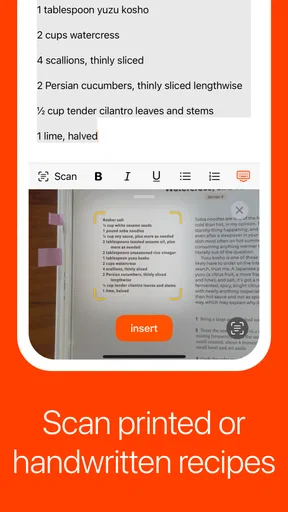
One of the coolest features of Umami is its ability to import recipes from pretty much anywhere. Have a favorite blog you like to follow? You can import directly from there. Got old family recipes scribbled on paper? Snap a photo, and it’s in the app. The app’s OCR (optical character recognition) is surprisingly accurate, which means less time editing and more time cooking.
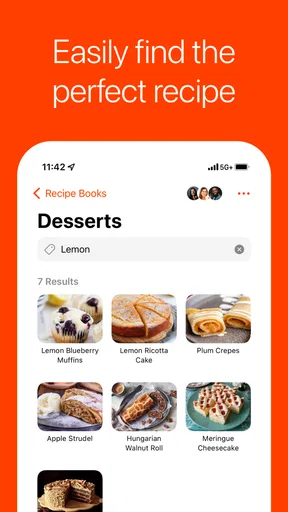
I also appreciated the tagging system. You can tag recipes by cuisine, meal type, or even dietary preferences. This came in handy when I was planning a dinner party and wanted to keep things vegetarian. A quick search, and I had a list of options ready to go.
Meal Planning Made Easy
Meal planning is something I’ve always aspired to do but never quite managed to stick with. Umami makes it not only feasible but actually enjoyable. The app allows you to drag and drop recipes into a calendar, offering a visual layout of your week’s meals. And if you’re someone who likes to plan meals around what’s in season, the app lets you filter recipes by seasonal ingredients.
Another nifty feature is the grocery list. Once you’ve decided what to cook, the app generates a shopping list based on your chosen recipes. No more forgetting that one crucial ingredient – Umami’s got your back.
Customizing Your Culinary Experience
One thing that sets Umami apart from other recipe managers is its customization options. You can adjust serving sizes with a tap, and the app will recalculate ingredient quantities for you. This is perfect for those times when you’re cooking for a crowd or just for yourself.
Moreover, the app allows you to add personal notes to each recipe. Whether you discovered a little trick that enhances the flavor or you need to remember to add a pinch of salt next time, you can jot it all down in the app.
Sharing and Discovering
Cooking is often a communal activity, and Umami embraces this aspect wholeheartedly. You can share recipes with friends and family directly through the app. It’s a great way to swap culinary secrets or just inspire someone to try something new.
Plus, the app includes a discovery section where you can browse popular recipes from other users. It’s like having a culinary community at your fingertips, and you never know when you’ll stumble upon your next family favorite.
Final Thoughts
All in all, Umami - Recipe Manager is a gem for anyone who loves cooking but could use a little help in the organization department. It’s user-friendly, packed with features, and genuinely enhances the cooking experience. Whether you’re a seasoned chef or a kitchen newbie, this app is bound to make your culinary adventures more enjoyable and far less stressful.
So, if you’re ready to transform your cooking routine, give Umami a try. It just might become your new favorite kitchen companion. Bon appétit!
Verdict
Strengths of Umami - Recipe Manager
- User-friendly interface for easy navigation.
- Syncs across devices for seamless access.
- Supports multiple languages for recipes.
- Offers offline access to saved recipes.
- Allows custom recipe categorization.
Limitations of Umami - Recipe Manager
- Limited free features without subscription.
- Occasional sync issues reported by users.
- No direct integration with grocery apps.
- Some features require internet connection.
- Recipe import tool can be finicky.
Similar Picks in This Category
View All
Rappi: Food Delivery, Grocery
Rappi, Inc - Delivery3.5

McDonald’s: Cupons e Delivery
Arcos Dorados4.3

Swiggy: Food Instamart Dineout
Swiggy4.7

Blinkit: Groceries & more
Blinkit4.8

foodpanda: food & groceries
Foodpanda GmbH a subsidiary of Delivery Hero SE4.0

Zomato: Food Delivery & Dining
Zomato4.7
Frequently Asked Questions
What is Umami - Recipe Manager and how does it work?
Umami - Recipe Manager is a user-friendly app designed to organize and manage your recipes in one convenient place. It allows you to import recipes from websites, add your own, and categorize them by meal type, cuisine, or dietary restrictions. The intuitive interface makes it easy to search and access recipes whenever you need them.
Can I use Umami - Recipe Manager offline?
Yes, Umami - Recipe Manager offers offline functionality, allowing you to access your saved recipes without an internet connection. This is particularly useful when cooking in areas with limited connectivity or when traveling. All features, including editing and organizing your recipes, are available offline.
Does Umami - Recipe Manager support meal planning and grocery lists?
Absolutely. Umami - Recipe Manager includes robust meal planning features that enable you to schedule meals for the week, helping you stay organized. Additionally, the app can generate grocery lists based on your planned meals, ensuring you have all the ingredients needed for your recipes.
Is it possible to share recipes with others using Umami - Recipe Manager?
Yes, sharing is easy with Umami - Recipe Manager. You can share your favorite recipes via email, social media, or messaging apps. The app provides various formats for sharing, making it convenient to spread culinary inspiration among friends and family.
Are there any subscription fees or in-app purchases in Umami - Recipe Manager?
Umami - Recipe Manager is free to download, but it offers a premium version with additional features such as advanced meal planning tools, cloud sync, and ad-free usage. Users can choose between monthly or yearly subscriptions, depending on their needs and preferences.
